Make e-invoices
An e-invoice is an invoice as a file your client's accounting can read in by itself. Billr makes that file from your invoice, checks it against the rules of the format and sends it along with your invoice email.
About this feature: E-invoicing
Updated

What Billr does and does not do
Billr makes the e-invoice of a final invoice and checks it against the rules of the format before it goes out. Billr can send the file along with your invoice email, or you download it and deliver it yourself.
In Poland Billr also sends your invoices to KSeF for you, with your own KSeF token.
Billr does not send e-invoices through the Peppol network, is not connected to SdI in Italy, does not send to ANAF in Romania and does not report invoice data to NAV in Hungary. Billr does not make VeriFactu records in Spain yet. Where your e-invoice has to go through one of those, you deliver the file yourself. Whether an e-invoice meets the law also depends on how it reaches your client, and that stays your responsibility.
Set up e-invoicing
Go to Settings and choose E-invoicing. Billr shows what it needs as a list, with how many items are done and a link to where you set each one.
- Country. Your business's country, under Business details. The country decides which formats you can choose.
- Format. Billr chooses your country's usual format. To choose another, choose Change next to it, or go to Invoice Settings, Options, E-invoice format.
- The checks. Billr makes a sample invoice from your own details and checks it. If something is missing, such as your address, your tax ID or your payment details, it shows here as an item, with a link that opens the field.
- Reason for lines without tax. Only needed if you invoice without tax. See Invoice layout, tax and currency.
When everything is done, it says Ready: Billr makes your e-invoices as followed by your format.
Which format in which country
| Country | Formats in Billr | How it reaches your client |
|---|---|---|
| Germany | XRechnung (UBL or CII), Factur-X / ZUGFeRD, Peppol BIS | Email is allowed. Billr can send it along. |
| Italy | FatturaPA (FPR12) | Through SdI: you upload the file yourself in the free Fatture e Corrispettivi portal. |
| Poland | KSeF FA(3) | Through KSeF: Billr sends it with your KSeF token, or you load the file yourself in the free Aplikacja Podatnika KSeF. |
| Spain | Facturae 3.2.2, Peppol BIS, Factur-X / ZUGFeRD | Email is allowed between businesses. A public body wants Facturae with an electronic signature through FACe, which Billr does not make yet. |
| Romania | RO e-Factura (CIUS-RO) | Through SPV, within 5 working days of the invoice date: you upload the file yourself under "Factura electronică". |
| Hungary | Peppol BIS, Factur-X / ZUGFeRD | The client gets the PDF, or Peppol BIS or Factur-X if wanted. The invoice data also has to be reported to NAV, which Billr does not do yet. |
| Every other country | Peppol BIS, Factur-X / ZUGFeRD | By email, or through your own Peppol provider or platform where the law asks for it. |
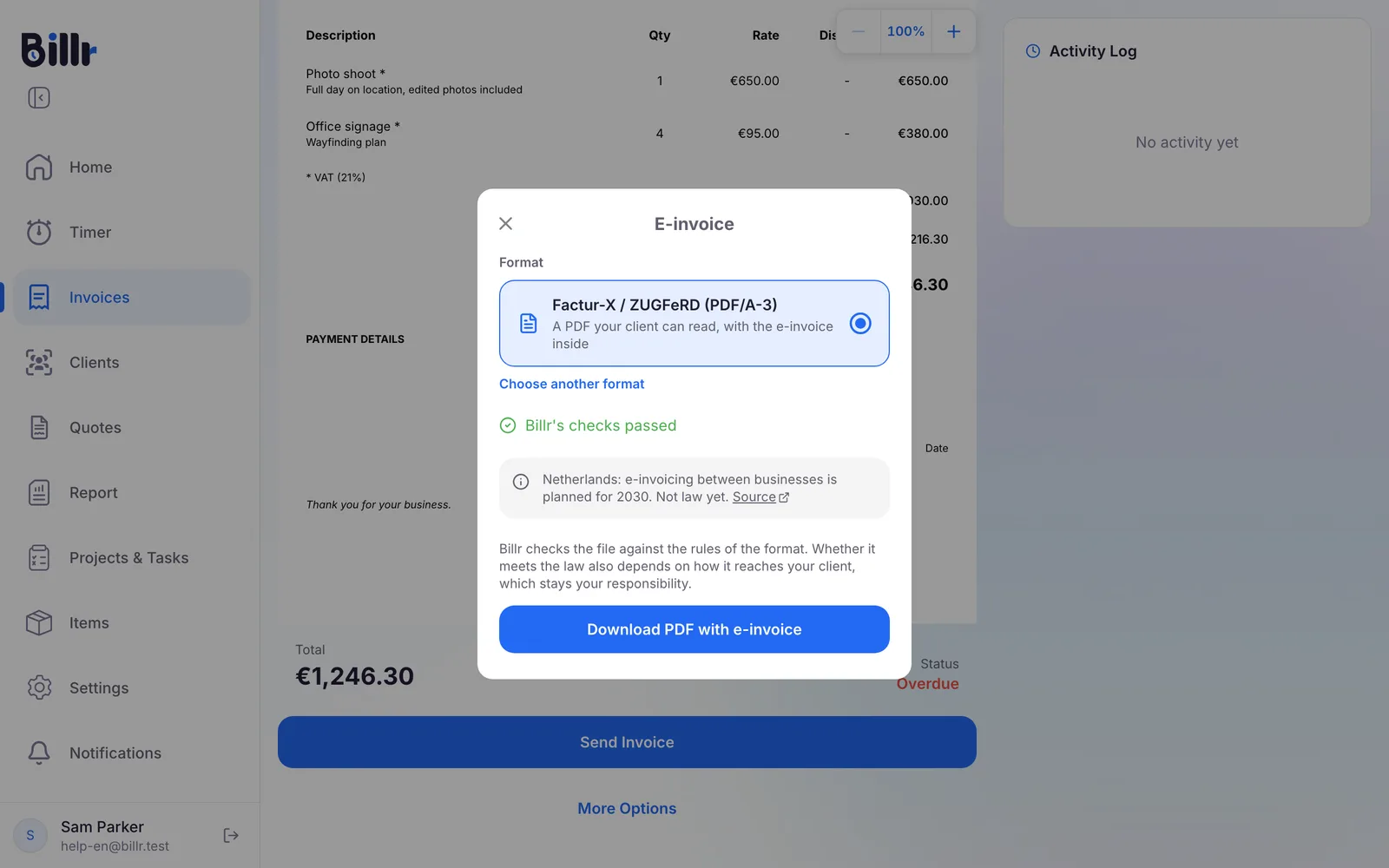
Factur-X is a PDF your client can read, with the e-invoice inside. The other formats are an XML file.
Your country's rules
When you open the e-invoice of an invoice, Billr shows your country's rules under the checks, with a link to the source. For example:
- Germany: an e-invoice may be sent by email. Every business must be able to receive e-invoices; sending them becomes mandatory from 2027 or 2028, depending on turnover.
- Italy: invoices must go through SdI, or they count as not issued. You upload the file in Fatture e Corrispettivi; no digital signature is needed.
- Poland: invoices must be issued in KSeF, on their invoice date. A copy for your client outside KSeF needs the KSeF QR code: once KSeF has the invoice, Billr puts that code on the PDF.
- Romania: invoices must go into RO e-Factura. Upload the file in SPV within 5 working days of the invoice date.
- Spain: invoicing software must meet VeriFactu, and B2B e-invoicing starts in 2027 and 2028. Billr does not support VeriFactu yet.
- Hungary: invoice data must be reported to NAV. Billr does not do this yet.
- Belgium: B2B e-invoices must go through the Peppol network. Billr makes the file; send it with your own Peppol provider.
- France: e-invoices must go through an approved platform (plateforme agréée). Billr makes the file; your platform sends it.
- Portugal: invoices must be made with certified software. Billr is not certified in Portugal.
- Netherlands: e-invoicing between businesses is planned for 2030. It is not law yet.
- Estonia: a client registered as an e-invoice recipient may ask for an e-invoice.
For Croatia, Greece, Mexico, Türkiye and the United Arab Emirates, Billr says that it does not do the delivery the law asks for. For Slovakia and Norway, it says that e-invoices go through Peppol from 2027.
What Billr needs from your client
Open the client and choose Edit Client. The fields for e-invoices are with the business details.
- Client type: Business, Consumer or Public body. In Germany a public body needs a Client reference, the Leitweg-ID.
- Tax ID: needed for reverse charge and for an EU delivery. Billr checks its form per country; in Italy also the check digit of the partita IVA.
- Client reference: a Leitweg-ID or your client's order number. It goes on the e-invoice.
- Italy only, Delivery through SdI: your client's Codice destinatario (7 characters) or PEC address. Without one, SdI delivers to the channel your client registered.
A draft invoice follows the client: change the client's tax ID or address and the draft and its e-invoice take the new details. A final invoice keeps the details it was made with.
Peppol ID and address type
Only Peppol BIS needs an address of its own: the Peppol ID, where e-invoices arrive in the Peppol network. With every other format, the email address is enough. You find the field under Business details for yourself and under Edit Client for your client, once your format is Peppol BIS.
A Peppol ID is an Address type plus a number. The list shows the address types of the party's own country first:
| Country | Address types |
|---|---|
| Germany | Tax ID (9930), Public body ID (0204, the Leitweg-ID) |
| Netherlands | Tax ID (9944), Business registration number (0106), Public body ID (0190, OIN) |
| Belgium | Tax ID (9925), Business registration number (0208) |
| France | Tax ID (9957), Business registration number (0009, SIRET) |
| Austria, Italy, Spain, Portugal | Tax ID (9915, 0211, 9920, 9946) |
| Poland, Romania, Hungary | Tax ID (9945, 9947, 9910) |
| Estonia | Tax ID (9931), Business registration number (0191) |
| Sweden, Norway, Denmark, Finland | Business registration number (0007, 0192, 0184, 0037) |
| Any country | GLN (0088), DUNS number (0060) |
When the address type is a tax ID, you type nothing: Billr takes the number from the Tax ID field and shows Taken from the tax ID above. With an empty Peppol ID, Billr offers Use the tax ID. Peppol does not accept an email address, and an Italian SdI code is for FatturaPA only.
Send or download an e-invoice
Switch on Send along when sending under E-invoicing. When you then choose Send Invoice:
- through Billr, the XML goes in the email next to the PDF. Factur-X replaces the PDF: it is one PDF with the e-invoice inside;
- with your own mail app, Billr shares or downloads the file together with the PDF.
If the e-invoice cannot be made, Billr sends nothing and says why. With KSeF FA(3) the switch is not there: that invoice goes to KSeF, not by email.
You can also download it on its own: open a final invoice, choose More Options and then E-invoice. You see the format, the checks, your country's rules and the button Download XML or Download PDF with e-invoice.
Send to KSeF (Poland)
In Poland an invoice is only issued once it is in KSeF. Billr sends it there for you.
- Create a KSeF token. In the free Aplikacja Podatnika KSeF, create a token with the permission to issue invoices.
- Save it in Billr. Go to Settings, Business details, KSeF token. Paste the token and choose Save Token. Billr checks it with KSeF first. Only an Admin or the Owner can do this.
- Send an invoice. Open a final invoice, choose More Options, E-invoice and then Send to KSeF.
When KSeF accepts the invoice, Billr shows In KSeF, number with the number KSeF gave it. The PDF then carries KSeF's QR code, with that number under it. If KSeF is still processing the invoice, choose Check Again a little later.
A credit note goes to KSeF the same way, as a correction (KOR) with its own KSeF number: on the credited invoice choose More Options, E-invoice of the Credit Note and Send to KSeF.
Without a token you can still download the file and load it yourself in Aplikacja Podatnika KSeF.
Italy, Romania and Spain: what to know
- Italy. Billr makes the FatturaPA with your partita IVA, the Natura code for lines without tax and, if you charge it, the cassa previdenziale. For the ritenuta d'acconto you choose under Business details who withholds it (Natural person (RT01) or Legal person (RT02)) and the payment reason from model CU. You upload the file in Fatture e Corrispettivi; the file name already has the form SdI expects.
- Romania. Billr makes the RO e-Factura (CIUS-RO) with your CUI and the județ of the address. Download it and upload it in SPV under "Factura electronică" within 5 working days. With Send along when sending on, your client also gets the XML with the invoice email.
- Spain. Facturae is Spain's own format and the only one besides FatturaPA with room for withholding (IRPF). Crediting a final invoice gives a factura rectificativa as Facturae.
VeriFactu (Spain)
VeriFactu applies from 1 January 2027 to companies and from 1 July 2027 to everyone else, autónomos too. It does not apply in the Basque Country and Navarre, or if you use SII.
Under Settings, Business details, Billr asks for your Tax territory and whether you use SII, and says whether VeriFactu will apply to you. Billr does not make VeriFactu records yet: until VeriFactu applies, nothing changes for you.
The check before an invoice becomes final
When you make an invoice final or send it, Billr first checks whether the e-invoice is complete. If something is missing, Your e-invoice is not complete yet appears, with a link for each item: to your business details, or straight to the client. To go on without an e-invoice anyway, choose Make Final Anyway. With Send along when sending on, that is not offered: an email without the e-invoice it promises does not go out.
A final invoice no longer changes, and neither does its e-invoice. If something has to be different, credit the invoice and make a new one. A credit note gets its own e-invoice: on the credited invoice choose More Options and E-invoice of the Credit Note. More about crediting is in Create and send invoices.
What is not possible (yet)
- Sending through Peppol, SdI, ANAF or NAV. Billr makes the file; you deliver it. Only KSeF in Poland is sent from Billr.
- VeriFactu records in Spain, and TicketBAI in the Basque Country and Navarre.
- Withholding. An invoice with withholding (Withholding Tax) can only be made as FatturaPA or Facturae. The other formats have no place for it.
- A fixed discount amount on the whole invoice. Use a percentage.
- Receiving e-invoices. Billr makes the invoices you send.
- Spain. Facturae only in euros, without an electronic signature, and not for the Canary Islands, Ceuta and Melilla.
Frequently asked questions
Can Billr make e-invoices, such as XRechnung, ZUGFeRD or Peppol?
Yes, in every plan, the Free plan too. Billr makes XRechnung, Factur-X / ZUGFeRD, Peppol BIS, FatturaPA, Facturae, KSeF FA(3) and RO e-Factura files from your final invoices. Before an invoice becomes final, Billr checks the e-invoice and says in plain words what is missing, with a link to where you fix it. Set it up under Settings, E-invoicing.
Do I need e-invoicing?
In Germany, Italy, Poland, Romania, Belgium and France e-invoices between businesses are required or soon will be. In Germany every business must be able to receive them since 2025, and sending becomes required from 2027 (over 800,000 euros turnover) and from 2028 for everyone. Elsewhere you need one when a client or a public body asks for it.
How do I set up e-invoicing?
Open Settings, E-invoicing. The checklist shows what Billr needs, and each line takes you to where you fill it in.
- Your business country.
- The format, which Billr chooses for your country.
- Any detail the format still misses, such as your tax ID or address.
- The reason for lines without tax, needed if your invoices carry no tax.
When everything is done it says Ready. When you make an invoice final, Billr checks the e-invoice again, also against the client's details, and says in plain words what is missing, with a link to fix it. You can still choose Make Final Anyway, but then Billr cannot make an e-invoice of that invoice.
Which e-invoice format does Billr use in my country?
Billr picks the format from your business country.
- Germany: XRechnung, or Factur-X / ZUGFeRD or Peppol BIS if you prefer.
- Italy: FatturaPA.
- Poland: KSeF FA(3).
- Romania: RO e-Factura.
- Spain: Facturae, or Peppol BIS or Factur-X.
- Every other country, Hungary, Belgium and France among them: Peppol BIS or Factur-X.
Factur-X is a PDF your client can read, with the e-invoice inside; the others are XML files. You see and change the format under Settings, E-invoicing. Italy, Poland and Romania only take invoices in their own currency: euro, złoty and lei.
Does Billr send my e-invoices to the tax authority?
Only to KSeF in Poland. There Billr sends your invoices and credit notes with your own KSeF token, which you save under Settings, Business details. Everywhere else Billr makes the file and you deliver it.
- Italy: you upload the FatturaPA yourself in the free Fatture e Corrispettivi portal (SdI).
- Romania: you upload the RO e-Factura yourself in SPV, within 5 working days.
- Hungary: Billr does not report invoice data to NAV yet.
- Spain: Billr does not make or send VeriFactu records yet.
Between businesses Billr can send the e-invoice along with your invoice email, which is allowed in most countries. Billr is not connected to SdI, ANAF, NAV, the AEAT or the Peppol network.
How do I send the e-invoice to my client?
There are two ways.
- Switch on Send along when sending under Settings, E-invoicing. Every invoice you send then carries its e-invoice: an XML file next to the PDF, or with Factur-X one PDF with the e-invoice inside. This works when Billr sends the email and when you use your own mail app.
- Or open a final invoice and choose More Options, E-invoice to download the file and send it any way you like.
In Poland the FA(3) file goes to KSeF, not by email, so the switch is not there. In Belgium and France the e-invoice has to go through a Peppol provider or an approved platform: Billr makes the file, they deliver it.
What is a Peppol ID and where do I fill it in?
A Peppol ID is the address where e-invoices arrive in the Peppol network. Billr asks for it when your format is Peppol BIS, because Peppol does not deliver to an email address. Fill in your own under Settings, Business details, and your client's on the client. First pick the address type: the types of the country come at the top, for example the KVK number in the Netherlands or the enterprise number in Belgium. Often the tax ID is the Peppol ID, and then Billr takes it from the tax ID field. Ask your client which ID they are registered with. For a client in Italy you fill in the codice destinatario or PEC address instead.
How do I send invoices to KSeF in Poland?
Save your KSeF token under Settings, Business details, KSeF token. After a few seconds Billr shows the NIP the token belongs to. Then make an invoice in PLN final and choose More Options, E-invoice, Send to KSeF. Within a minute or two Billr shows the KSeF number, and the KSeF QR code with that number appears at the top of the PDF. A credit note goes to KSeF the same way, as a correction with its own KSeF number. Without a token you download the FA(3) file and load it yourself in Aplikacja Podatnika KSeF. Sending to KSeF is in every plan.
How does e-invoicing work for Italy?
Billr makes FatturaPA, the format SdI accepts, and you upload the file yourself in the free Fatture e Corrispettivi portal. Billr is not connected to SdI. Fill in your partita IVA under Settings, Business details, and for each client the partita IVA or codice fiscale, plus the codice destinatario or PEC address if they gave you one. Billr checks the partita IVA before the invoice becomes final. Ritenuta d'acconto, bollo and cassa previdenziale are supported. Invoice in euro: Billr makes FatturaPA in EUR only.
How does e-invoicing work for Romania?
Billr makes RO e-Factura from your final invoice. You upload the file yourself in SPV, under Factura electronică, within 5 working days of the invoice date; Billr does not send it to ANAF. Fill in your CUI and your county (județ) under Settings, Business details, and the CUI and county of each business client. For Bucharest, put the sector in the city field, for example Sector 1. Invoice in RON: Billr cannot make RO e-Factura in another currency yet.
Does Billr support VeriFactu?
Not yet. Billr does not make VeriFactu records or the VeriFactu QR code, and sends nothing to the AEAT. VeriFactu applies in Spain from 1 January 2027 to companies and from 1 July 2027 to everyone else, autónomos too, but not in the Basque Country and Navarre or if you use SII. Until then nothing changes for you. What Billr does for Spain today: Facturae e-invoices, with IRPF withholding, and a credit note as a factura rectificativa in Facturae. Under Settings, Business details Billr tells you whether VeriFactu will apply to you.
Can a credit note be an e-invoice?
Yes. When you credit a final invoice, open the credit note and download its e-invoice, in the same format as your invoices. In Spain the Facturae credit note is a factura rectificativa. In Poland the credit note becomes a correction (FA(3) KOR), which you send to KSeF just like an invoice and which gets its own KSeF number.
Can an invoice with withholding tax be an e-invoice?
Only as FatturaPA, the Italian format, or Facturae, the Spanish format. The European standard behind Peppol, XRechnung and Factur-X has no place for withholding, so Billr does not make those e-invoices for an invoice with withholding. If you do not have to withhold, switch off Withholding Tax under Settings, Tax and Currency.
Does e-invoicing cost extra?
No. Making and sending e-invoices is in every plan, the Free plan too. Delivering an e-invoice can cost money outside Billr in some countries, for example a Peppol access point in Belgium or a plateforme agréée in France.
Can I receive e-invoices in Billr?
No. Billr makes the invoices you send. If your country requires you to receive e-invoices, as Germany does for every business, you need a separate inbox or viewer for that.