Your Billr account and privacy
Your Billr account is how you sign in, on your phone and on the web. Here you manage your profile and settings, see where your data lives and, if you want to, delete your Billr account.
Updated

Sign up and sign in
Choose Get Started and pick how you want to sign up:
- Sign Up with Email asks for your name, company name and country, which Billr puts on your invoices. You confirm your email address before you sign in.
- Sign Up with Google, Sign Up with Apple or Sign Up with Microsoft take you straight into the app. You add your business details afterwards, see Getting started.
Always sign in the way you signed up. A Google or Apple sign-up has no password in Billr. Forgot your password? Forgot Password sends a link that is valid for one hour and works once.
Your profile and app settings
- Go to Settings and choose View Profile.
- Change your Name or your photo, and choose your Time Format: 12h or 24h.
- Choose Save Changes.
Account created with shows how you signed up. If that was with email, you also find Change Email and Change Password here.
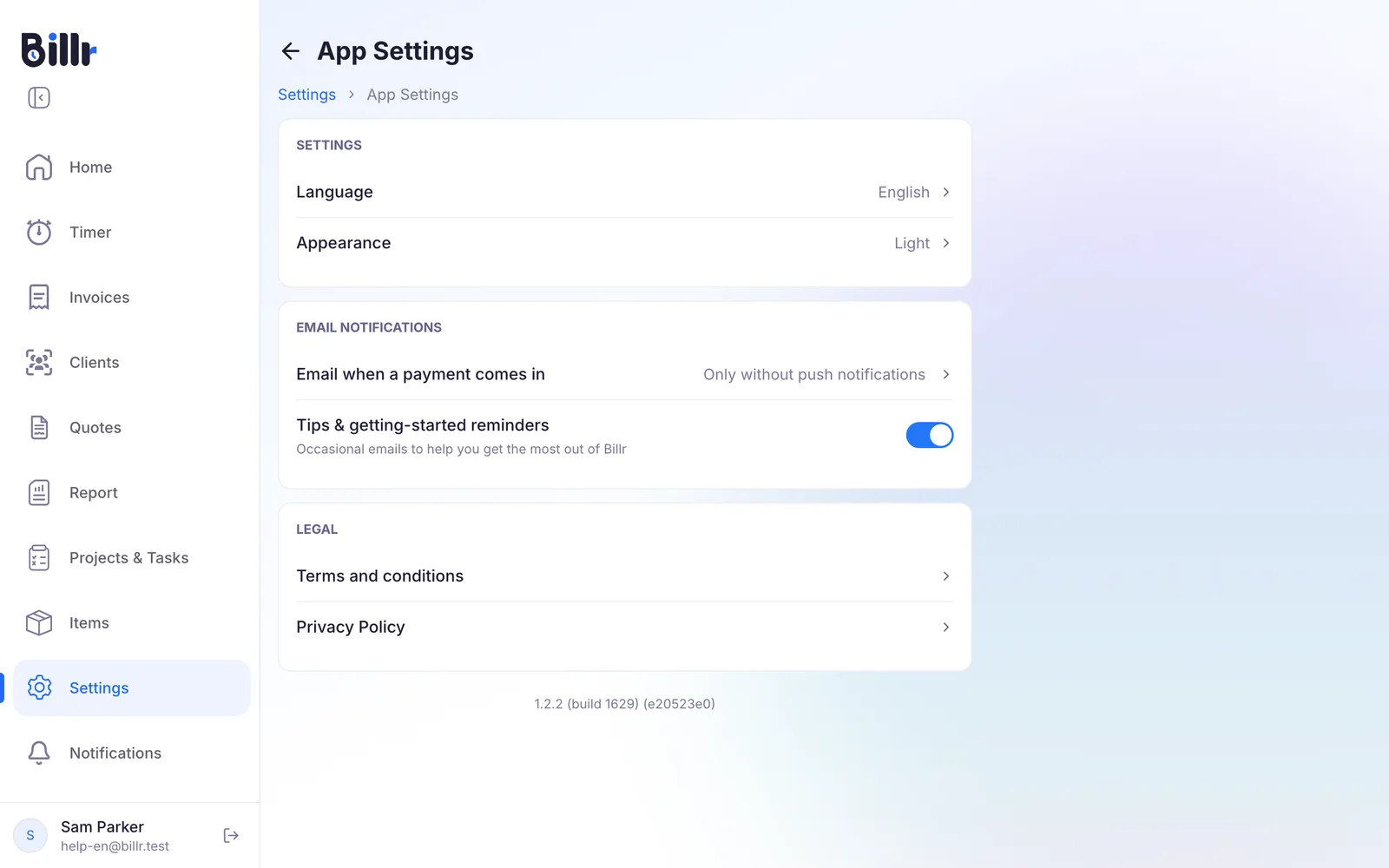
Under Settings, App Settings you choose:
- Language: one of the 10 languages Billr speaks. Your choice follows your Billr account to your other devices.
- Appearance: Light, Dark or System.
- Email when a payment comes in: Always, Only without push notifications or Never.
- Tips & getting-started reminders: occasional emails, on or off.
One device at a time
Your data goes where you go, but your Billr account is active on one device at a time. When you sign in somewhere else, Billr asks the device you were using to confirm, and stops and saves a running timer there. If that device does not respond, you can sign in anyway.
So one Billr account cannot be shared by two people. Invite the other person to your team instead. How Billr keeps working without internet is in Offline and sync.
Where your data is kept
Billr is made by Bliqo OÜ, a company registered in Estonia, in the EU. Your data is kept in two places:
- On your device, so the app works offline.
- In Billr's cloud database, which runs in the EU, in Frankfurt. That is what lets your phone and the web app show the same thing.
The Privacy Policy, under Settings, App Settings, says exactly what is stored and for how long. Need something more specific for a client or a contract? Ask support.
Get a deleted record back
Deleted clients, projects, tasks and invoices first go to the Trash: Settings, More Options, Trash. Restore a record from there within 21 days. After 21 days Billr deletes it for good.
In a team, only the Owner and the Admins can restore a deleted project.
Delete your Billr account
Deleting your Billr account does not cancel a subscription. First cancel it where you bought it, see Plans and billing.
- Go to Settings and choose View Profile.
- Choose Delete Account.
- Type DELETE to confirm.
This is permanent: your clients, invoices, projects and time entries go with it, and there is no undo. If you are the Owner of a team, the shared data of your team members is deleted too, and they are not warned. Tell them first.
Frequently asked questions
How do I create an account?
Install Billr, tap Get Started and pick how you want to sign up.
Sign Up with Email asks for your name, company name and country, which Billr uses on your invoices. You confirm your address before you sign in, and the confirmation mail can be sent again from the login screen.
Google, Apple or Microsoft take you straight into the app. You add those business details afterwards under Settings, Business details.
Either way you can change all of it later.
I cannot sign in. What should I check?
Four things to check.
Use the same method you signed up with; your profile screen says under Account created with which one that is. A Google or Apple account has no password in Billr.
For email, request a new link with Forgot Password: it is valid for one hour and works once.
If the app says your session is active elsewhere, take the session over on this device.
If you were invited, sign in with exactly the email address the invitation was sent to.
Can I use Billr on my phone and my laptop at the same time?
Your data goes where you go, but one account is active on one device at a time. When you sign in somewhere else, Billr asks the active device to approve it and stops and saves any running timer there. If that device does not answer, you can sign in anyway, and the other session is closed. Sharing one Billr account with someone else therefore does not work; invite them to your team instead.
How do I change the language?
Settings, App Settings, Language. Billr speaks English, Spanish, French, German, Italian, Dutch, Portuguese, Polish, Hindi and Turkish. The choice follows your account, so your other devices switch along with it. The language works offline too, because all ten are built into the app.
How do I delete my account?
Open your profile, tap Delete Account and type DELETE to confirm. This is permanent: your clients, invoices, projects and time entries go with it, and there is no undo. If you own a team, the shared data of your team members disappears as well and they are not warned, so tell them first. Important: deleting does not cancel a subscription. Cancel it first where you bought it: in the App Store or Google Play, or for a web purchase under Manage Subscription at app.billr.cloud.
Where is my data kept?
Billr is made by Bliqo OÜ, a company registered in Estonia, in the EU. Your data lives in two places: on your device, so the app works offline, and in Billr's cloud database, which runs in the EU, in Frankfurt, and is what lets your phone and the web app show the same thing. Settings, App Settings, Privacy Policy says exactly what is stored and for how long, and Delete Account removes it. If you need something more specific for a client or a contract, ask support.