Create and send quotes
A quote in Billr works like an invoice, with one difference. Your client signs it online. Once it is signed, it becomes an invoice in one step.
Updated

Create a quote
- Go to Quotes and choose Create Quote.
- Pick the client, or create one right there with Add Client. Fill in a Client header if the quote should go to someone's attention.
- Add lines with Add Item: a saved item, or a name, quantity and price of your own.
- Add a Discount or a note when you need one. Tax is added the same way as on an invoice.
- Check the Preview on the right: that is what your client gets.
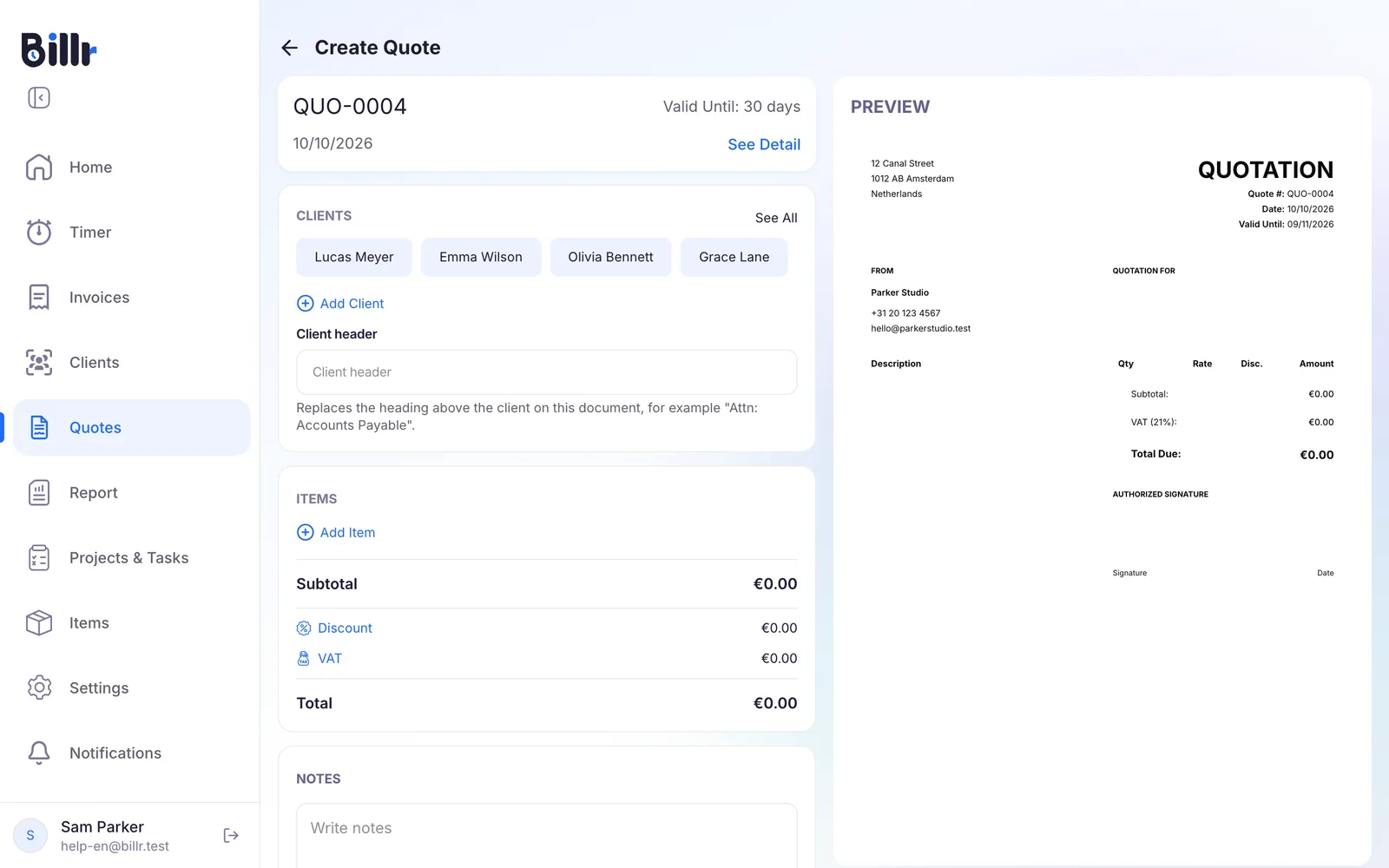
Billr numbers quotes on their own, with the QUO prefix: QUO-0001, QUO-0002 and so on. Every quote gets a Valid Until date, 30 days out by default; See Detail at the top changes it for this quote. The prefix and the default validity for new quotes live under Settings, Invoice Settings, Options, as described in Invoice layout, tax and currency.
Send it to sign
Open the quote and choose Send Quote. Billr emails your client the quote with a link to view and sign it, plus a six-digit access code. The status changes to Sent.
Want to send the link another way, for instance in a chat? Under More Options you find Copy Signing Link and Copy Access Code. The link only works once the quote counts as sent, so for a quote you share yourself, choose Mark as Sent first.
On the signing page your client enters the code, reads the quote, draws a signature and confirms. The quote then moves to Signed, you get a notification, and the quote is locked: nobody can change a signed quote any more.
Sent the link to the wrong person? Regenerate Link under More Options makes a new link and access code. The old link stops working.
What the statuses mean
Quotes lists your quotes by month, each with its status. At the bottom you see the total of the list.
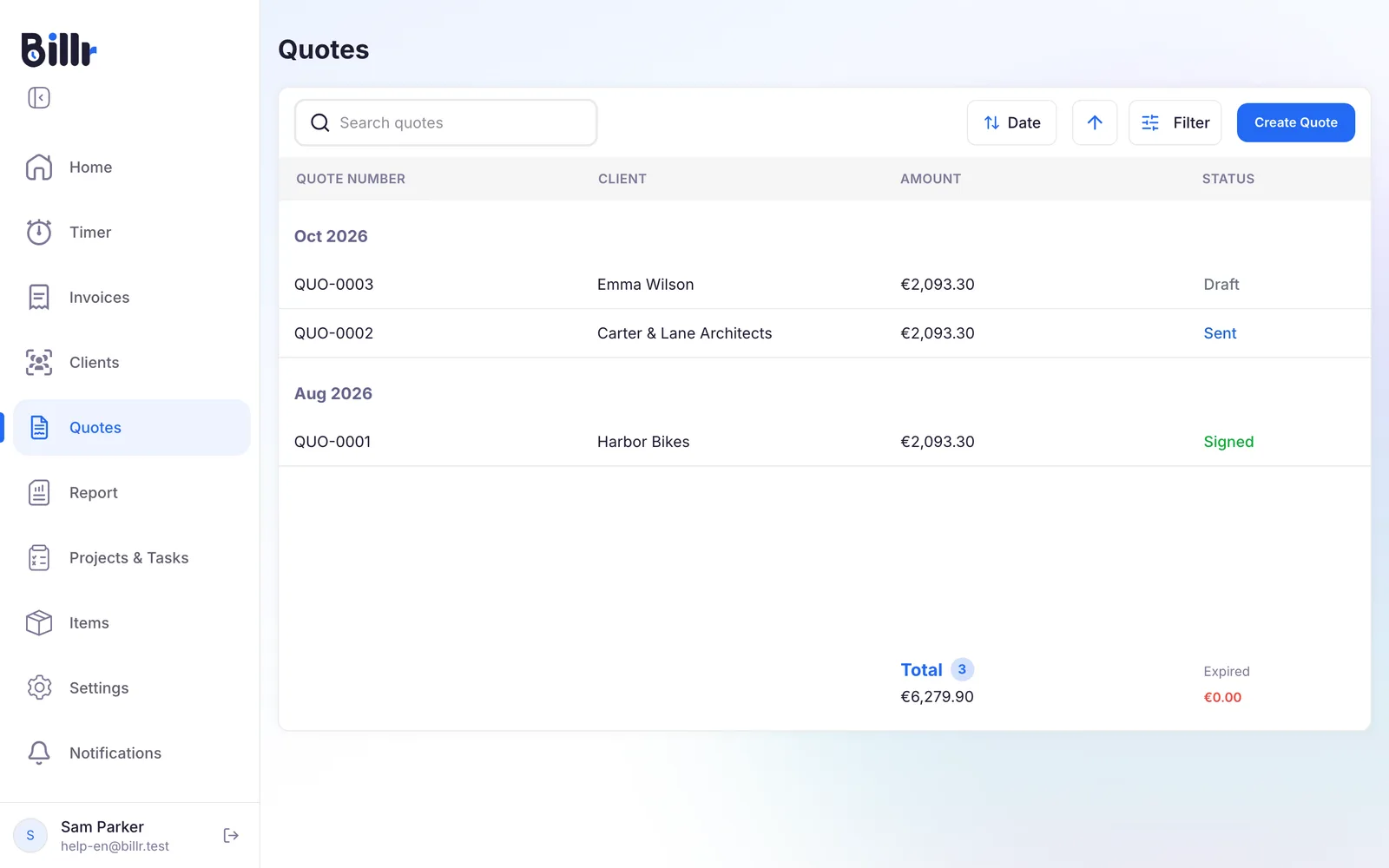
| Status | What it means |
|---|---|
| Draft | Not sent yet. You can still change everything. |
| Sent | Your client has the quote and can sign it. |
| Signed | Your client signed it. The quote is locked. |
| Declined | Your client declined it, sometimes with a reason. |
| Expired | The Valid Until date has passed. Your client can no longer sign it. |
A declined quote can be brought back with Reopen Quote. For an expired quote, choose Edit Quote, set a later Valid Until date and send it again with Resend Quote.
Turn a signed quote into an invoice
- Open the signed quote.
- Choose Convert to Invoice.
The lines, the discount and the tax carry over as they are, and you get a draft invoice you can still change before you send it. From then on View Invoice on the quote takes you straight to that invoice. How to send it is in Create and send invoices.
Need a similar quote for new work? Duplicate as New Quote on a signed quote starts a fresh one with the same lines.
On the Free plan you create 3 quotes a month, and an invoice made from a quote counts towards your invoices for that month. The paid plans are in Plans and billing.
Frequently asked questions
How do I make a quote?
Open Quotes and tap New Quote. It works like an invoice: pick the client, add your lines, discount, tax and a note. A quote gets its own number with the QUO prefix and a Valid Until date, 30 days out by default. Change that prefix and the default validity under Settings, Invoice Settings, Options.
How does my client sign a quote?
Tap Send Quote. The client gets an email with the quote and a View & Sign button, and on that page they do four things.
Enter the access code.
Read the quote.
Draw their signature.
Confirm the acceptance explicitly.
Billr records the signature, the moment and the technical details of the signing, notifies your team, and the quote moves to Signed. A signed quote can no longer be edited.
Why does my client need an access code for the quote?
The signing link is public, so the page is protected with a six digit access code. Billr puts the code in the same email as the link, and you can forward both yourself with Copy Signing Link and Copy Access Code, for instance through WhatsApp. After five wrong attempts the quote refuses further tries for ten minutes. Regenerate Link creates a new link and kills the old one.
How do I turn a signed quote into an invoice?
Open the quote and tap Convert to Invoice. All lines, the discount and the tax carry over one to one, and you get a normal draft invoice you can still change before sending. The quote keeps a link to the invoice, so View Invoice takes you straight to it. Note that the new invoice counts towards your monthly invoice limit.
What happens when a quote expires?
Billr compares the Valid Until date with today, so a quote moves to Expired on its own and shows up under that filter. The client can no longer sign it. To use it after all, choose Edit Quote, set a new Valid Until date and send it again with Resend Quote. Or use Duplicate as New Quote to start again with fresh prices. The default validity for new quotes is set under Settings, Invoice Settings, Options.